
By default, Shopify captures payment the moment an order is placed. Most stores are fine with that and never change it.
Some stores need to. Take a business that operates under Jewish law: capturing payment during Shabbat or a Jewish holiday isn't permitted under Halacha. A card authorization (a hold, with no money taken) is acceptable. A capture isn't.
The setup we built: manual payment capture in Shopify, plus a scheduled Shopify Flow that checks whether Shabbat or a holiday is active before every capture decision. The catch is that Shopify Flow has no idea when Shabbat starts or ends. Here is how we solved it.
The business requirement
Every order had to authorize at checkout and never capture automatically. Capture should still happen without anyone touching it, but only once two things are true: the fraud tool has approved the order, and no Shabbat or Jewish holiday is active.
An order placed during a restriction holds by itself and is captured once the restriction lifts. No manual step.
Why we kept it inside Shopify
The obvious route was a private app with its own server: a webhook on order creation, a calendar check, then capture or hold. That adds a dependency outside Shopify, a server that can go down and needs maintenance, and if it fails at the wrong moment, payment capture stops. The client didn't want that risk, and neither did we. The goal was to keep everything native, with no external server and nothing extra to maintain.
The difficulty is that Flow knows the hour and the day, but not when Shabbat begins or ends. That changes every week with sunset at the store's location, which shifts through the year.
So the Flow runs on Shopify's Scheduled time trigger every 20 minutes and, on each run, makes a live call to Hebcal, a free Jewish calendar service that returns the exact start and end times of Shabbat and Jewish holidays for a location. The Flow evaluates the response and makes one decision: is a restriction active right now or not. Every capture in that run follows that answer.
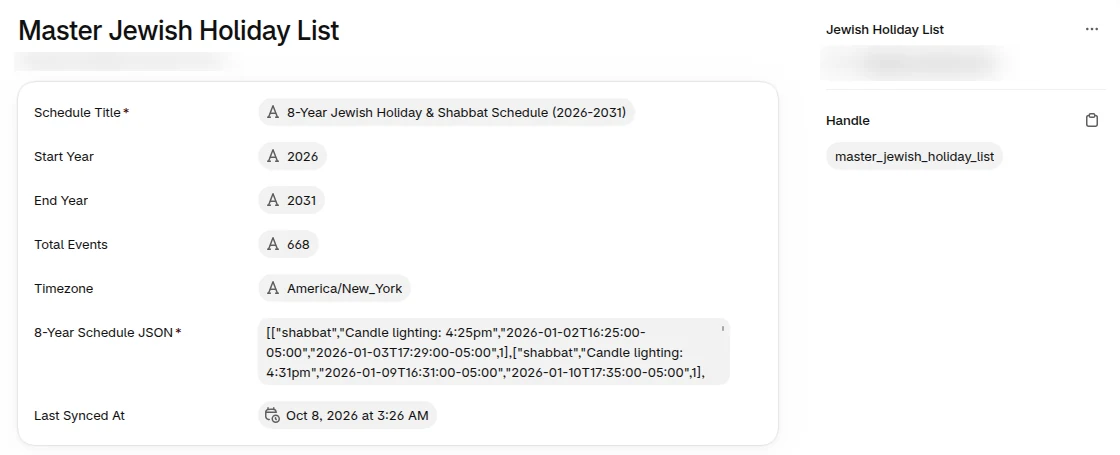
As a backup, we pulled the Shabbat and holiday times for 2026 through 2031 from Hebcal in advance and stored them in a Shopify metaobject. If Hebcal returns an error, the Flow uses that stored schedule instead. Two independent sources for the same check mean the payment logic doesn't break because of a third-party outage.
One plan requirement: the live Hebcal lookup runs through Flow's Send HTTP request action, which is only available on the Shopify Plus, Advanced and Grow plans. On the Basic plan only the stored-schedule check can run, without the live lookup.
Setting up manual payment capture
In the Shopify admin, go to Settings > Payments > Payment capture method and select Manually. Every order now only authorizes the card at checkout. Nothing is charged until the Flow captures it.
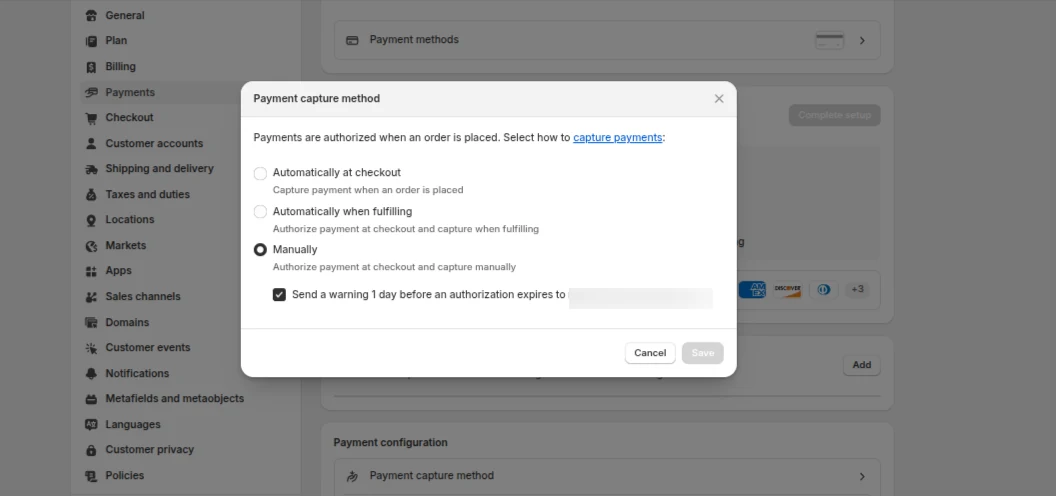
Also turn on Send a warning 1 day before an authorization expires. Shopify Payments holds an authorization for 7 days. Shopify Plus stores can get a longer window on some cards, but capturing after the standard 7 days adds a 1.75% charge, and other payment gateways set their own limits. The warning email is the safety net either way, especially around long holiday weekends. Note that Shopify sends it for manual capture only when the store uses Shopify Payments.
Fetching the right orders
The Flow only picks up orders that the fraud tool has cleared or that are already flagged as recurring subscription orders, so a payment is never captured before one of those checks has passed.
Each run asks for orders that are authorized, open and unfulfilled, carry the fraud tool's tag (or the subscription app's recurring-order tag), and were created at least 15 minutes earlier. Flow's Get order data action returns up to 100 orders a run, sorted oldest first, so if a backlog builds over a long holiday, the orders closest to their authorization expiry are captured first.
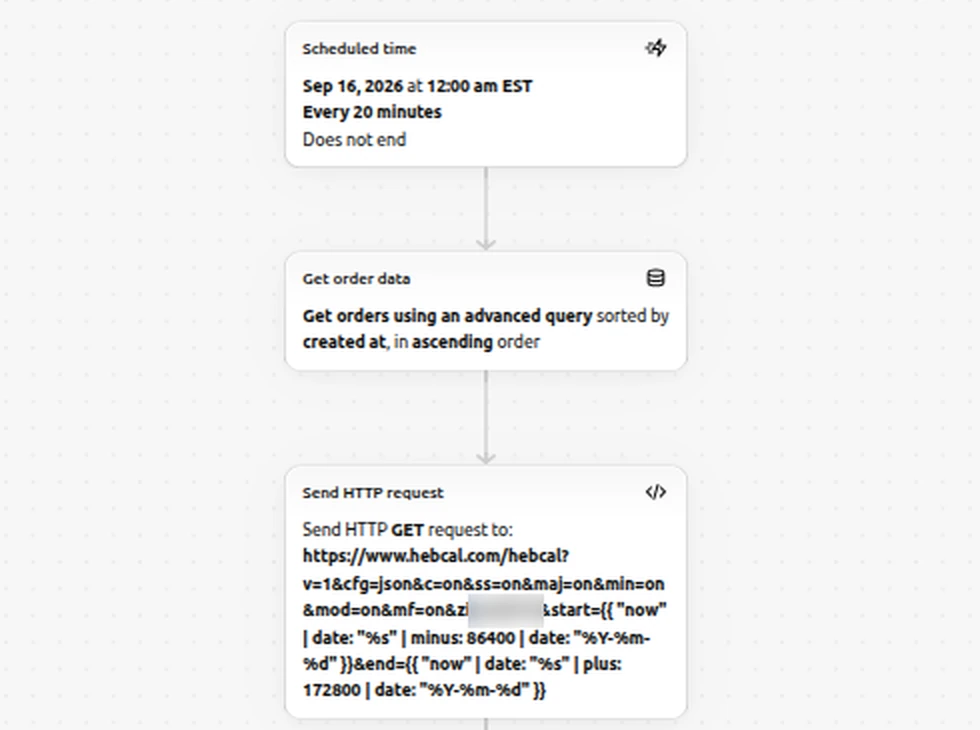
Why 20 minutes, not 10? The schedule can run as often as every 10 minutes, but this store's post-purchase upsell window stays open for about 10 minutes, and the fraud tool needs a little time to tag the order. Running every 20 minutes, with the 15-minute order-age filter, gives both time to finish before a capture decision. Tune the interval to your own upsell and fraud-review windows.
Checking Shabbat and holiday status
On every run, the Flow asks Hebcal whether a restriction is active: the weekly Shabbat, or a multi-day holiday such as Rosh Hashana or Passover. Hebcal adjusts the times to the store's location, so nobody maintains a calendar by hand.
The metaobject fallback
When Hebcal returns an error, the Flow uses the schedule stored in the metaobject instead, so there is no single point of failure. The admin team can also add a hold for specific dates directly in the metaobject's schedule, without touching the Flow.
Capture or hold
For each order, the Flow checks four things: the payment can still be captured, it is still authorized, the fraud tool has cleared it or it is a recurring subscription order, and no restriction is active. If all four hold, the payment is captured and the order is tagged.
If a restriction is active or the fraud check hasn't cleared, the order stays authorized and is picked up by the next run. Once Shabbat ends, the very next run captures it.
Important constraints
- Card authorizations expire. The Shopify Payments window is 7 days; Plus stores can extend it on some cards, with a 1.75% charge for capturing after the standard 7 days, and other gateways set their own limits. A multi-day Yom Tov followed directly by Shabbat can come close to whichever limit applies. Turn on the expiry warning before go-live.
- Havdalah timing is a religious decision, not a technical one. Communities follow 42, 50 or 72 minutes after sunset. Confirm the right timing with the client's rabbi before the Flow goes live.
- Order edits and upsell apps need a separate check. If a third-party app creates an additional authorization on an order (a post-purchase upsell or an order edit, for example), Shopify's capture action may not pick up that second authorization. If your store runs upsell or order-edit apps, confirm the capture step covers every authorization on the order, not only the first.
How we can help
If your Shopify store has payment capture requirements that the standard settings can't handle (religious observance, fraud-gated capture, ERP constraints, or any business rule tied to a calendar or time of day), we design and build the Flow and the supporting setup to make it reliable. For a setup like this, the work covers:
- Shopify Flow design and setup: the trigger, the schedule and the capture logic
- Fraud tool integration, so a payment is captured only after approval
- End-to-end testing and go-live support
A capture rule Shopify's settings can't cover?Tell us how and when your payments need to be captured, and we'll show you how it can run inside Shopify. Get in touch for a quote.
Talk to our teamFrequently asked questions
Does this need a custom app?
No. It runs in native Shopify Flow. The check for Shabbat and holiday times runs inside the Flow with Shopify's Run code action.
What happens if the holiday calendar service goes down?
It depends on how it fails. If Hebcal answers with an error, such as a 500, the Flow is set to ignore it and continue to the Run code step, which switches to the stored metaobject schedule for that run. If Hebcal doesn't answer at all, Flow retries the request instead of moving on, so that run waits rather than capturing anything. Either way, no order is captured on a restricted day: an outage can delay a capture, never cause a wrong one.
Does it handle multi-day holidays like Rosh Hashana or Passover?
Yes. It covers the major Jewish holidays, including multi-day ones and a holiday that runs straight into Shabbat.
What if a card authorization expires before the order is captured?
The capture fails. With Shopify Payments, Shopify sends the expiry warning a day before, so you can capture the payment by hand or ask the customer to pay again.
Can the same pattern work for other calendars?
Yes. It works for any business rule tied to a calendar or time of day, not only Jewish observance.
Sources
- Shopify Help Center, Payment authorization and capture, checked November 25, 2026
- Shopify Help Center, Send HTTP request, Scheduled time, Get order data and Run code, checked November 25, 2026
- Shabbat and Jewish holiday times are provided by Hebcal.com, used under the Creative Commons Attribution 4.0 license (Hebcal developer APIs, checked November 25, 2026)
